
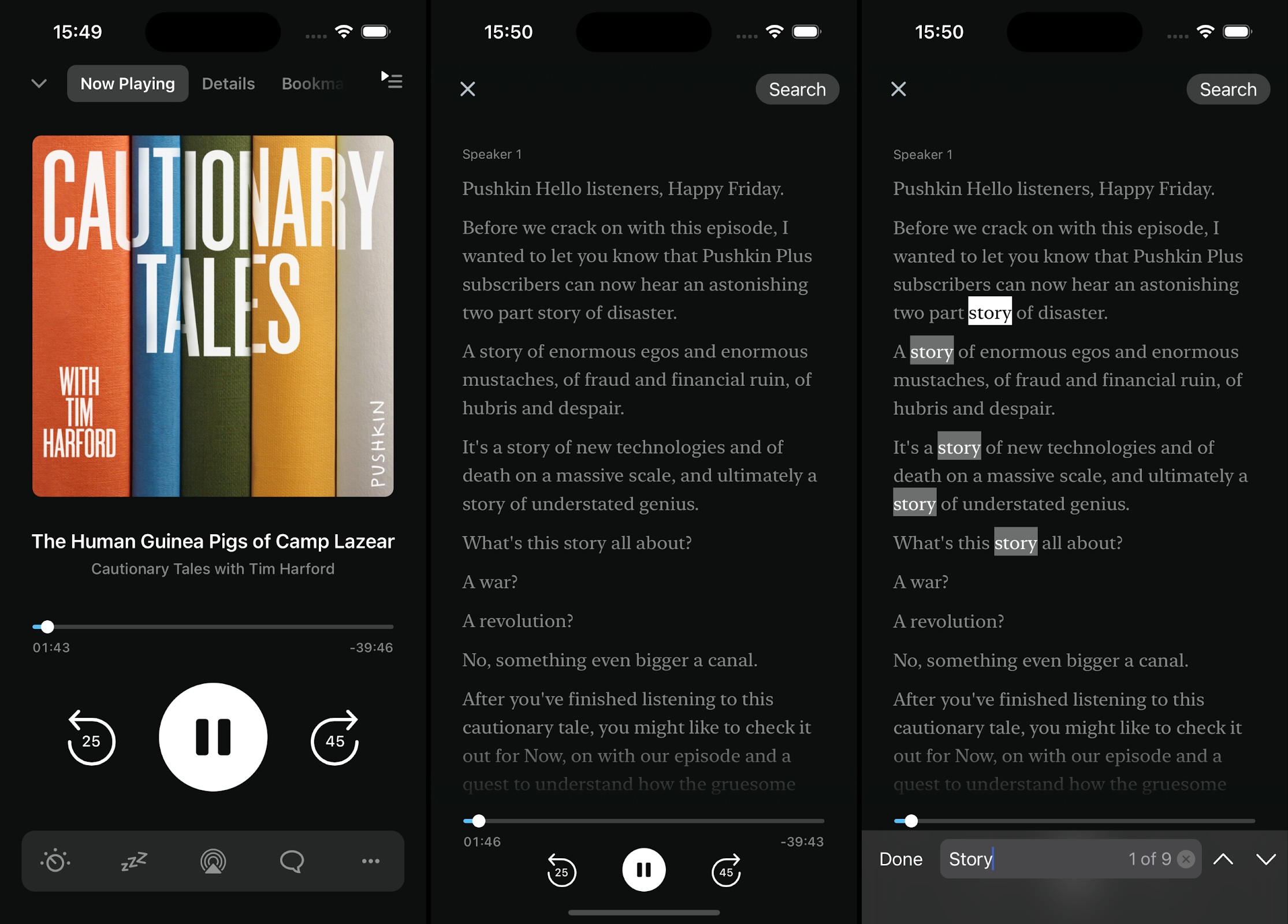
Pocket Casts is excited to support podcast transcripts through the Podcasting 2.0 Transcript tag! All Pocket Casts users on Android and iOS can access transcripts directly within the app for episodes where podcast creators have included this feature in their feed.
As of May 2025 Pocket Casts Plus and Patron subscribers can also see automatically generated transcripts for select podcasts. These transcripts are generated by Pocket Casts’ servers and are identified by the star icon.
From the Episode Details view: tap the View Transcript button located above the episode description. When viewing the transcript you can tap Share to share the transcript text. Tap Play or Pause to listen to the episode while viewing the transcript. Or, tap Search to look for specific text in the transcript.
From the Now Playing screen: tap the Transcript button  in the Player Toolbar to view the current episode’s transcript. If the Transcript button isn’t visible in the Player Toolbar, it might be hidden in the More Actions menu. You can customize your Player Toolbar according to these steps:
- Tap the three dot menu at the very right of the toolbar.
- Tap Edit or the pencil icon on the upper-right corner of “More Actions.”
- Use the drag handles to move “Transcript” inside the “Shortcut on Player” section.
- Tap “Done” in iOS or the back arrow in Android.
- You should now see “Transcript” in your Player Toolbar.
When a transcript is available the button becomes active and can be tapped. If no transcript is available, the button is disabled or not shown.
While viewing a transcript, tap the Search button to find specific text within the transcript. Tap the Share button to share the transcript text. Playback controls including play/pause, skip forward and skip backwards are located at the bottom of the screen.
While listening to a podcast episode that includes a transcript, you’ll see a Transcript button appear within the Now Playing bar, to the right of the episode playback scrubber. You can click on the Transcript button to reveal the transcript and click on the Transcript button again or the “X” to dismiss it.
You can also view an episode’s transcript from the episode’s details view. Click on the episode’s title in the Now Playing bar or on an episode within a list to view its details. The transcript preview for that episode, if one is available, will be displayed above the episode’s description. You can click on the transcript to view it in full.
The transcript feature is available for episodes that the podcast author has included a transcript, and for podcasts where the transcript has been automatically generated on Pocket Casts’ servers. Automatically generated transcripts are available exclusively to Pocket Casts Plus and Patron subscribers, only for select podcasts, and only for episodes that are less than 2 hours in length.
If you’d like to see transcripts for episodes of your favorite podcast and they are not currently being automatically generated, you can do one of the following:
- Reach out to the podcast author directly and request that they include transcripts using the required tag in the RSS feed.
- Contact us to request a generated transcript. While it’s not guaranteed we can provide a transcript, our team can check if generating a transcript for a specific episode is possible.
The View Transcript button for automatically generated transcripts includes a star icon. The Pocket Casts app will also display a notice above the transcript to indicate how it was created.
This notice is not displayed if the transcript is included in the podcast’s feed by the podcast creator.
Automatically generated transcripts are, currently, only available for select podcasts. We are choosing to create transcripts for some of the most popular podcasts at launch and plan to include more shows in the future.
In order for Pocket Casts to discover transcripts for an episode and offer them within the app, the podcast feed must include the <podcast:transcript> element and the transcript must be in one of the following formats: VTT, SRT, PodcastIndex JSON, or HTML. More information about the tag is available here.
